I Replaced My Entire Growth Team With 6 AI Agents. Here Is the Full System.
The week everything changed, I was not in front of my computer.Three content pieces went out before 9am. Four leads got qualified and follow...
📝 摘要
本文详细介绍了一套用 6 个 AI Agent 替代完整增长团队的自动化系统架构。系统基于 Claude 推理引擎、Notion 共享记忆数据库和 N8N 编排调度三层基础设施,由 CEO、CMO、Lead Pipeline、Outreach、Insights、COO 六个 Agent 组成,每个 Agent 在固定时间自动运行并通过共享数据库实现上下文传递。CEO 每日 6am 分配任务,CMO 基于竞品分析和历史洞察生成内容,Lead Pipeline 管理线索生命周期,Outreach 发送个性化触达序列,Insights 从全量数据中提取转化模式,COO 汇总日报闭环——形成一个自学习的持续优化循环。
核心概念: 单个 Agent 之间信息孤岛是系统最大的瓶颈;通过 Notion 共享记忆数据库让所有 Agent 读取全局上下文、写入各自产出,实现了从"AI 工具集"到"AI 团队"的质变。
关键技术栈 / 关键要点:
- Notion 共享记忆数据库 — 6 张表(Tasks / Content / Leads / Outreach / Insights / Daily Reports)存储全部运营数据,所有 Agent 可读、各自可写,防止循环写入同时确保全局上下文
- N8N 编排调度 — 每个 Agent 对应一个 N8N 工作流,通过 Schedule trigger 在固定时间触发(6am → 9pm),实现无人值守的全天自动化
- Claude 驱动推理 — 所有 Agent 的决策逻辑由 Claude 处理,Notion 数据作为上下文注入 prompt
- Insights Agent 自学习闭环 — 下午 4pm 运行,跨表分析 7 天数据,识别转化模式并写入 Insights 表,使其他 Agent 的输出持续优化
- 冷启动问题与校准期 — 第一周 Insights 表为空,系统产出基于通用最佳实践而非历史数据;需手动运行一周校准 prompt 后再开启自动化
- Outreach 渐进自动化 — 前两周人工审核所有外发消息,确认质量后才配置自动发送,避免规模化发送低质量内容
关键结论 / 实践建议: 该系统的核心价值不在于单个 Agent 有多聪明,而在于共享记忆使系统整体持续进化;建议先手动运行一周校准 prompt,再逐步开启自动化,尤其注意 Outreach 环节需人工审核后再放开。
The week everything changed, I was not in front of my computer.
Three content pieces went out before 9am. Four leads got qualified and followed up before I had opened my laptop. The outreach sequences had gone out overnight personalised to each contact based on what had been converting that week.
One of those four leads booked a discovery call the same day. Another replied to an outreach message referencing something the Insights agent had flagged as a converting angle three days earlier. I had not written that message. I had not sent it. The system had identified the pattern, applied it to the right contact, and sent it at the right time.
That was the first week the system ran without me touching anything. I had built it two weeks earlier and spent the first week running it manually to calibrate the prompts.
By week three, two of the four leads from that first autonomous week had converted. Not because the outreach was brilliant. Because no lead went uncontacted, no follow-up was missed, and every message was informed by what had actually been working.
This article is the full architecture. Six agents, one shared memory database, and the exact setup that makes the whole thing run on its own.
Why One Agent Is Not Enough
Most people building with Claude have one agent doing everything.
One session for research. One for content. One for outreach. Each one starts cold. None of them know what the others found. The insights that came out of the content session never reach the outreach session. The lead data never informs the content strategy. Everything stays siloed.
The shared memory database is what changes this.
Every agent in this system reads from a central Notion database before it starts work. Every agent writes its outputs back to the same database when it finishes. The next agent to run does not start from zero. It starts from everything every other agent has already done.
This is the difference between a set of AI tools and an AI team. The individual agents are not smarter. The system is smarter because the memory is shared.
The Architecture
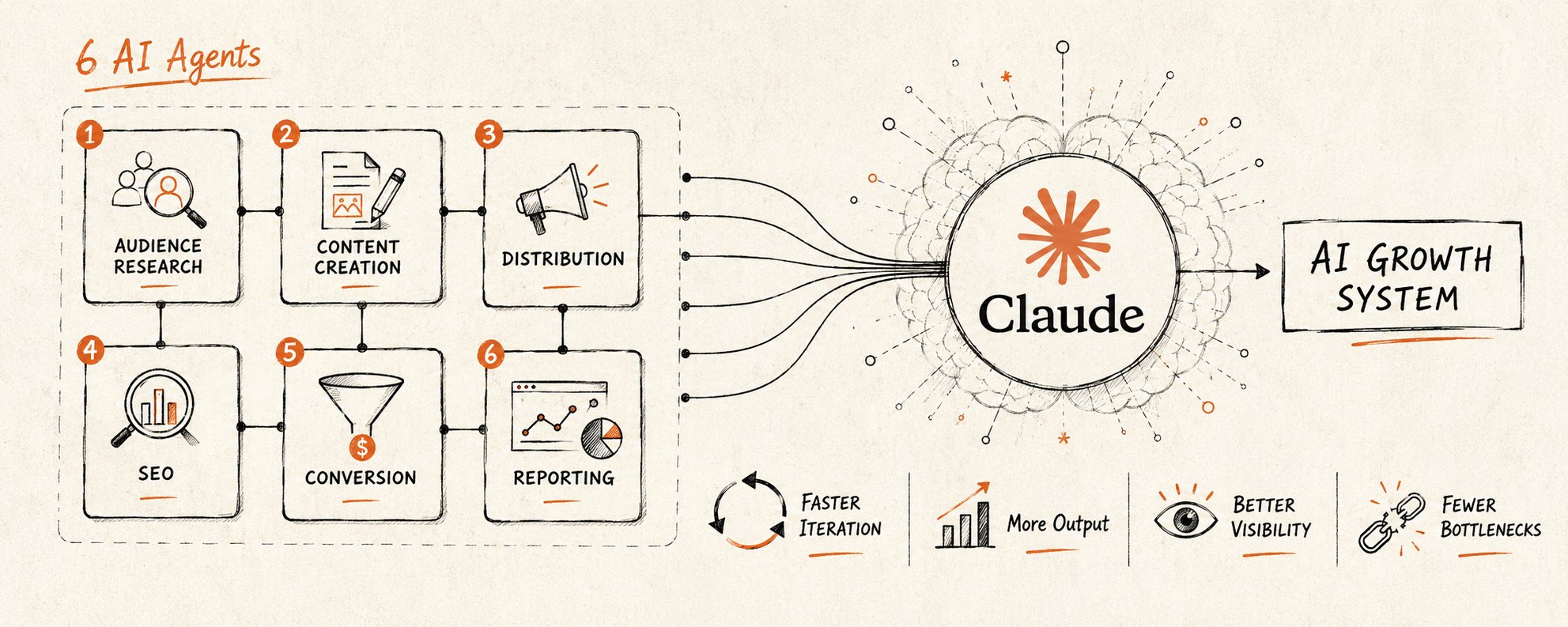
Six agents. One Notion database. N8N handling all the scheduling and orchestration. Claude powering the reasoning inside every agent.
The database has six tables:
- Tasks — what needs to be done, who it is assigned to, current status
- Content — scripts, posts, and briefs produced by the CMO agent
- Leads — every inbound contact, stage, conversation history, qualification status
- Outreach — sequences sent, responses received, what is converting
- Insights — patterns and signals the Insights agent has identified
- Daily Reports — the COO's compiled summaries that the CEO reads each morning
Every agent has read access to every table. Every agent writes only to its own table. The CEO agent reads everything and writes to the Tasks table. This prevents circular writes while ensuring every agent has full context.
The exact fields for each table:
Tasks table: Agent, Task Description, Priority (High/Medium/Low), Status (Pending/In Progress/Done), Assigned Date, Due Date, Notes
Content table: Title, Format (Reel/Post/Thread), Script, Platform, Status (Draft/Scheduled/Published), Engagement Score, Date Created, Source Insight
Leads table: Name, Company, Source, Stage (New/Contacted/Qualified/Call Booked/Closed/Cold), Qualification Score (1-10), ICP Fit (Yes/No/Partial), Last Contact Date, Next Action, Conversation Notes
Outreach table: Lead Name, Channel (Email/SMS), Sequence Name, Step Number, Message Text, Send Date, Response (Yes/No/Not Yet), Response Notes, Converting (Yes/No)
Insights table: Date, Category (Content/Outreach/Leads), Pattern Description, Supporting Data, Confidence (High/Medium/Low), Recommendation, Actioned By
Daily Reports table: Date, CEO Allocations, CMO Output, Lead Pipeline Summary, Outreach Performance, Insights Findings, Flagged Items, Tomorrow Focus
Build these exactly. The field names matter because the agent prompts reference them by name.
Agent 1: The CEO
What it does: Runs every morning at 6am. Reads the previous day's Daily Report from the COO agent. Reviews all open tasks and their completion status. Then allocates today's work by writing new task assignments to every other agent in the Tasks table.
Why it matters: Without a coordination layer, agents work in parallel but not in sequence. The CEO agent creates the daily priority order. It decides which leads the Outreach agent should focus on today based on what the Insights agent flagged yesterday. It decides how many reels the CMO should produce based on current campaign performance. It is the brain that ensures the system works as a team, not as five isolated processes.
N8N trigger: Schedule node at 6:00am daily, connected to Notion read and write nodes.
Prompt
You are the CEO of a growth operation. Read the Daily Report from yesterday in the database.Then review all open tasks across every agent.Allocate today's work by writing specific assignments to each agent: - CMO Agent: how many pieces of content, which formats, any specific angles to prioritise - Lead Pipeline Agent: which lead stages need attention today - Outreach Agent: which segments to prioritise, any sequences to pause or accelerate - Insights Agent: what specific question to investigate today based on yesterday's performance - COO Agent: any specific metrics to include in tonight's reportWrite each assignment to the Tasks table with the agent name, the task, and today's date. Be specific. Vague assignments produce vague output.
Agent 2: The CMO
What it does: Reads its assigned tasks from the Tasks table. Searches for the top three performing competitor pieces from the last 24 hours in its category. Analyses what made them perform using the Insights table for context on what is currently resonating. Scripts three new pieces of content calibrated to the same patterns. Writes completed scripts to the Content table.
Why it matters: Most content teams either copy competitors blindly or ignore them entirely. This agent does neither. It analyses why something performed, cross-references it against what the Insights agent has identified as patterns that convert for this specific brand, and produces content that is competitive intelligence applied to your voice.
N8N trigger: Runs at 7:00am, after CEO agent completes. Reads from Tasks table where agent = CMO.
Prompt
You are the CMO of a content operation. Read your task assignment from the Tasks table for today.Then complete the following:1. Research: Search for the three highest-performing pieces of content in your niche from the last 24 hours. For each, note: the hook, the format, the estimated engagement, and the single reason it likely performed.2. Insight check: Read the Insights table. Note any patterns flagged as currently converting.3. Production: Script three new pieces of content using the patterns you identified. Each script must include: hook (first three seconds), main body, and call to action. Format: short-form video script.Write each completed script to the Content table with today's date and a performance prediction. Every piece must trace to a specific insight or competitor signal. No generic content.
Agent 3: The Lead Pipeline Agent
What it does: Reads every inbound lead currently in the Leads table. Updates the stage of any lead where time has elapsed past the follow-up window. Flags any lead that has gone cold and needs a re-engagement sequence. Reviews the qualification status of any new leads that came in overnight and determines fit based on the ICP criteria stored in the database.
Why it matters: Lead pipelines die from neglect. A lead that does not hear back within 24 hours drops its conversion probability significantly. This agent ensures no lead goes stale, every follow-up happens on time, and every new contact is qualified before anyone spends time on a call.
N8N trigger: Runs at 8:00am. Reads from Leads table. Writes qualification notes and stage updates back to the same table.
Prompt
You are the Lead Pipeline Manager. Read every lead currently in the Leads table.For each lead, do the following:1. Stage check: Has this lead received a follow-up within the required window? If not, flag it as overdue and write a recommended next action.2. Qualification: For any lead marked as unqualified, review their information against the ICP criteria in the database. Write a qualification score from 1 to 10 and a one-sentence reason.3. Cold leads: Any lead with no activity in seven or more days should be flagged for re-engagement. Write the flag to the Leads table.Write all updates back to the Leads table. Your job is to ensure every lead is tracked, qualified, and followed up on time. Nothing falls through.
Agent 4: The Outreach Agent
What it does: Reads its daily assignment from the Tasks table. Pulls the current converting patterns from the Insights table. Generates personalised email and SMS sequences for the lead segments assigned by the CEO agent. Writes sent sequences to the Outreach table and logs response data as it comes in.
Why it matters: Generic outreach fails because it treats everyone the same. This agent personalises at scale by using live data from the Insights agent on what is actually converting. Every message is built on what worked yesterday, not what worked six months ago when the sequence was originally written.
N8N trigger: Runs at 9:00am. Reads from Tasks and Insights tables. Writes to Outreach table.
Prompt
You are the Outreach Manager. Read your task assignment from the Tasks table for today.Then read the Insights table. Note what is currently converting: which angles, which subject lines, which offers, which follow-up timing.For the lead segments assigned to you today: 1. Write a personalised email sequence of three touchpoints for each segment 2. Write a supporting SMS sequence of two touchpoints for segments where SMS is enabled 3. Each message must reference a specific insight from the Insights table that informed itWrite all sequences to the Outreach table with: segment name, channel, message text, and send date. Every message must have a specific reason for being sent. No filler. No generic value propositions.
Agent 5: The Insights Agent
What it does: Runs once in the afternoon after the day's outreach and content have had time to generate data. Reads across all tables to identify patterns: which content pieces performed, which outreach angles generated responses, which lead sources are converting at the highest rate, which follow-up timing is working. Writes a structured insights report to the Insights table.
Why it matters: This is the agent that makes every other agent smarter over time. Without it, each agent operates on static assumptions. With it, every agent has access to live performance data that updates daily. The system does not just run. It learns.
N8N trigger: Runs at 4:00pm. Reads from Content, Outreach, and Leads tables. Writes to Insights table.
One gap to address before building this: Social performance data does not automatically appear in Notion. Instagram, X, and YouTube engagement numbers live on their platforms. You need a separate automation to pull them in before the Insights agent runs at 4pm.
The simplest fix: a Zapier or N8N workflow that runs at 3pm daily, pulls the last 24 hours of analytics from each platform you post on via their APIs, and updates the Engagement Score field in the Content table. The Insights agent then reads real numbers instead of empty fields.
Without this step the Insights agent produces generic observations. With it, the pattern detection is grounded in actual data.
Prompt
You are the Insights Analyst. Read across the Content, Outreach, and Leads tables from the last seven days.Identify and document the following:1. Content: Which pieces performed above average? What do they have in common? Name the pattern in one sentence.2. Outreach: Which sequences generated the most responses? What angle, subject line, or timing distinguished them?3. Leads: Which lead sources are converting at the highest rate? What pattern distinguishes leads that converted from leads that went cold?4. Recommendation: The single highest-leverage change any other agent should make tomorrow based on this data.Write your findings to the Insights table with today's date. Every insight must trace to data. No generic observations.
Agent 6: The COO
What it does: Runs every evening at 9:00pm. Reads the full output from every other agent across every table for that day. Compiles a structured daily report covering what was completed, what was flagged, what performed, and what needs attention tomorrow. Writes the report to the Daily Reports table where the CEO agent will read it at 6:00am the next morning.
Why it matters: This is the agent that closes the loop. CEO reads COO report. CEO allocates work. Agents execute all day. COO compiles the results. CEO reads the report the next morning. Without the COO, the CEO has no coherent summary to work from. With it, the cycle runs continuously and improves with every pass.
N8N trigger: Runs at 9:00pm. Reads from all tables. Writes to Daily Reports table.
Prompt
You are the COO. At the end of every day you compile the full operational report.Read today's entries across every table: Tasks, Content, Leads, Outreach, Insights.Write a structured daily report with the following sections:1. Completed today: What each agent finished 2. Flagged items: Anything overdue, underperforming, or requiring a human decision 3. Performance summary: Key numbers from today — content engagement, outreach response rates, leads qualified, leads converted 4. Top insight from today: The single most important pattern from the Insights agent 5. Recommended focus for tomorrow: Where the CEO should direct resources based on todayWrite this report to the Daily Reports table with today's date. This report is what the CEO reads at 6:00am. Make it complete. Make it actionable.
What This System Cannot Do On Its Own
Three honest limitations before you build.
The cold start problem is real. In week one the Insights table is empty. The CMO agent has no performance patterns to reference, so it produces content based on general best practices rather than what works for your specific audience. The Outreach agent sends sequences with no calibration data behind them. This is not a flaw in the architecture. It is how any learning system starts. The outputs in week one are useful but not optimised. Optimisation happens in weeks two and three as the Insights table fills.
Outreach should not be fully automated on day one. The Outreach agent writes sequences and logs them to the Outreach table. Before you configure the N8N workflow to send those sequences automatically, review them manually for two weeks. Read every message. Confirm that the personalisation logic is working correctly and that nothing is sending to the wrong segment or referencing stale data. Automate the sending step only after the review step has shown consistent quality. An outreach agent sending bad messages at scale does more damage than doing it manually.
The agents can conflict if you are not careful. If the Lead Pipeline agent updates a lead's stage at 8am and the Outreach agent reads a cached version of that lead at 9am, the Outreach agent may send a sequence to a lead who has already been moved to a different stage. The fix is to always read from Notion live at the start of each workflow, never from a cached variable from a previous step. Build each N8N workflow so the Notion read node runs immediately before the Claude node, not at the start of the workflow as a shared variable.
How to Build This
Step 1: Set up the Notion database
Create a new Notion workspace. Build the six tables: Tasks, Content, Leads, Outreach, Insights, Daily Reports. Connect Notion to Claude via the Notion MCP so agents can read and write programmatically.
Step 2: Install N8N
Self-host N8N or use N8N Cloud. Both work. Self-hosted means your data never leaves your infrastructure. Create one workflow per agent with a Schedule trigger at the correct time.
Step 3: Build each workflow
Each workflow follows the same pattern:
Schedule trigger → Notion read node (pulls relevant tables) → Claude API node (paste the agent prompt) → Notion write node (writes output back to the correct table)
The Claude API node takes the agent prompt plus the Notion data as context. The output goes directly back into Notion.
Step 4: Run manually for the first week
Do not automate immediately. Run each agent manually in sequence for the first week and read every output. Fix prompts where the output is off. Automate only after outputs are consistently good.
Step 5: Set the schedule triggers
- CEO: 6:00am
- CMO: 7:00am
- Lead Pipeline: 8:00am
- Outreach: 9:00am
- Insights: 4:00pm
- COO: 9:00pm
The system runs from that point without you initiating anything.
What Changes After Three Weeks
Week one: the system runs but does not yet learn.
The CMO agent produces decent content because the prompt is good. But it cannot reference converting patterns because the Insights table has nothing in it yet. The Outreach agent sends sequences that are well-written but generic because there is no history of what has worked. The CEO agent makes allocation decisions based on thin data.
This is also where the prompts break. In week one you will find that one agent is writing to the wrong Notion field, another is producing output in a format the next agent cannot parse, and the COO report is too long because nobody told it how much to compress. Fix these manually. Do not skip week one. It is where the calibration happens.
The moment you know the system is actually working:
Somewhere in week two or three, the Outreach agent sends a message to a lead that references a specific angle the Insights agent flagged as converting three days earlier. The lead replies. You read the reply and trace it back through the Outreach table to the sequence, back to the Insights table entry that informed it, back to the Content performance data that produced that insight.
The whole chain is visible. The system identified a pattern, applied it to the right contact, sent the message at the right time, and generated a real response. You did not decide any of that. The shared memory did.
That is the moment the architecture stops being a concept and starts being a business asset.
Week three: compounding becomes measurable.
The CEO agent is reading three weeks of COO reports. Its allocations are no longer guesses. The Insights table has enough pattern history that the CMO is producing content that consistently outperforms the week one output. The Outreach agent is not using assumptions from when you built the prompts. It is using data from three days ago.
The work that used to require daily attention becomes infrastructure. The system gets sharper every cycle. That is the actual shift: not that the agents are doing work, but that the work is happening without you managing when and whether it happens.
Follow @damidefi on X for daily Claude AI tools, crypto analysis, and the full journey to 100K. Bookmark this. Share it with one business owner still running their growth operation manually.